Tours
Every click becomes a step with a spotlight or a centred popup. Type the copy straight into the tooltip, on your real UI.
Stepsome turns one click-through into an in-app onboarding tour and a polished product video. No code, no account, nothing to set up.
Your tours and recordings stay in your browser. Open it with Alt Shift T.
Your onboarding shouldn’t wait three sprints. Click through your app, publish one file, and it is live.
Every click becomes a step with a spotlight or a centred popup. Type the copy straight into the tooltip, on your real UI.
Pulsing dots next to the things worth discovering. Each one opens its own tip, whenever the user is ready.
Help text on a single element, on hover or click. Add GIFs or short looping clips to show instead of tell.
Point at one new feature. Gone for good after “Got it”, or snoozed for a few days.
An announcement in a window, anywhere on screen. A button can open a link or start a full tour.
A bar at the top or bottom for launches and promotions. Schedule it from one date to another.
A task list for new users that ticks itself off as they go. Any item can start a tour.
“New” and “Beta” labels on menu items and buttons. They hide after a date or once clicked.
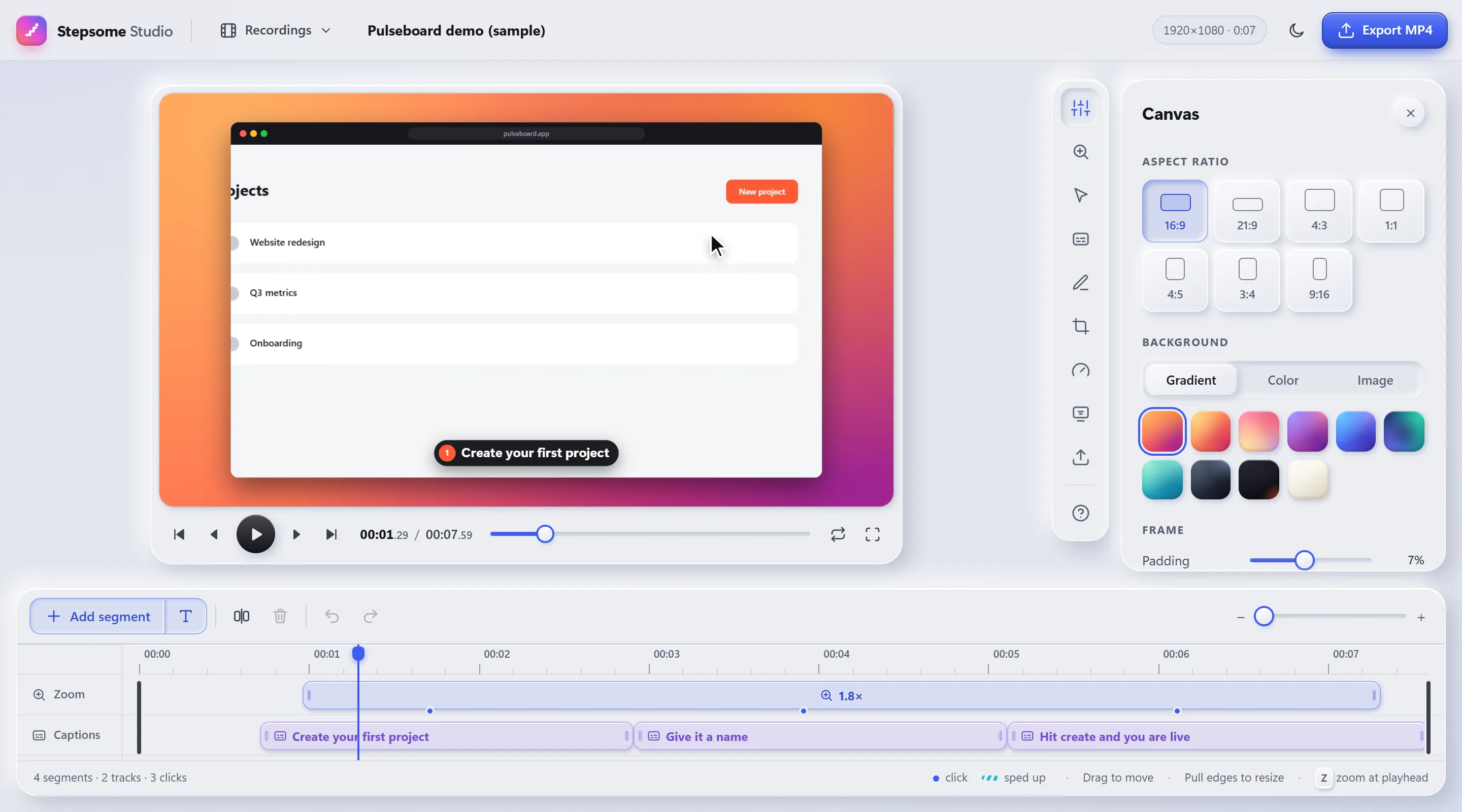
Hit Make video and Autopilot clicks through your steps for you. The Studio opens with zooms already placed on every click.
Every tour and widget carries its own rules. Set them once in the editor.
IDs in an address become :id on their own. Build on one project, show on all of them.
Each step keeps backup selectors and the element’s text, and tries them in order.
A click, typing, hover or form submit on any element you pick.
A date range and daily hours, in the visitor’s own time.
Read from <html lang>, the URL or your own code. One version per language.
Tell Stepsome who is signed in and target by plan, role or anything else you pass along.
Ready-made themes, or your own colours, fonts and corners, saved per site.
Views, completion and a funnel per step, stored on a small collector you host yourself on Cloudflare Workers or Node. Stepsome only reads it.
Events also flow into the tools you already load: PostHog, Plausible, Google Analytics, Umami and Mixpanel, or any webhook.
Click the extension icon or press Alt Shift T. The Stepsome bar appears at the bottom of your own app.
Every click becomes a step. Edit the text right in the tooltip, add a welcome popup, let the AI copywriter draft the rest.
Download a single script for your site, or copy a ready-made prompt for your AI coder. Then hit Make video.
Your tours, recordings and visitor data never pass through us. The only server we run handles licenses and payments, and AI suggestions go straight to the provider you choose, with your own key. Details in the privacy policy.
Install the extension and start. Nothing to sign up for.
Tours, themes and recordings are stored locally. Export the workspace to share or back up.
The read key stays in your browser and never ends up in the site file.
Visitors with Do Not Track or Global Privacy Control are not sent to the collector.
The tour your users need and the video your launch needs, from the same three clicks.
Everything you need to ship your first tour.
For products that onboard users every day.
Pay once. No subscription, ever.
Only to add one script file to your site, once. Everything else happens by pointing and clicking in your own app. If you use an AI coder, Stepsome gives you a prompt that does the install for you.
You publish one site file that holds everything you set to Published. After changes you download it again; the dashboard tells you when your live file is out of date.
Yes. IDs in URLs become wildcards on their own, Stepsome looks an element up again when your app re-renders it, and it never scrolls a target under a sticky header.
MP4 or WebM in 1080p, 1440p or 4K at 30 or 60 fps, plus GIF. Rendering happens in your browser, so keep the Studio tab visible during an export.
In your browser. Analytics, if you want them, go to a collector you host yourself or to the analytics tool your app already uses.
Sound and webcam in videos, share links and shared team accounts. Those need a server, and Stepsome does not have one.
Install the extension, open your app and start clicking. Your first tour is live before the coffee is cold.
Add Stepsome to Chrome